Python · Reinforcement learning
ReDySim RL
Train robots with reinforcement learning from a GUI: set a run up, watch the robot learn at every checkpoint, stop it when it goes wrong, and compare runs. No code to write.
Use the GUIDownload and installYour own code
Requirements: Python 3.10 or newer · ReDySim Fixed-base and Floating-base installed first (Linux x86-64; Windows and macOS coming soon)
Video tour
About ReDySim RL
Task, robot, reward weights, the signals the policy sees, and the learner, in one panel.
Every checkpoint is replayed as an animation while the run goes on.
See the behaviour go wrong and stop; the checkpoints are kept, and you can continue later, with a changed reward.
The return split into the terms of the reward: which one to re-weight.
256 new goals for the last and the best policy, with a do-nothing baseline.
Several runs, with their reward and learner settings side by side.
Your own task (a Python class) and your own robot (a ReDySim model file, closed loops included) can be loaded in the window or named in a run file: Writing your own task.
The GUI for runs
The GUI is the easiest way to train: it sets a run up, starts it, and plays every checkpoint as an animation while the curves grow, so a run can be stopped as soon as the behaviour goes wrong.
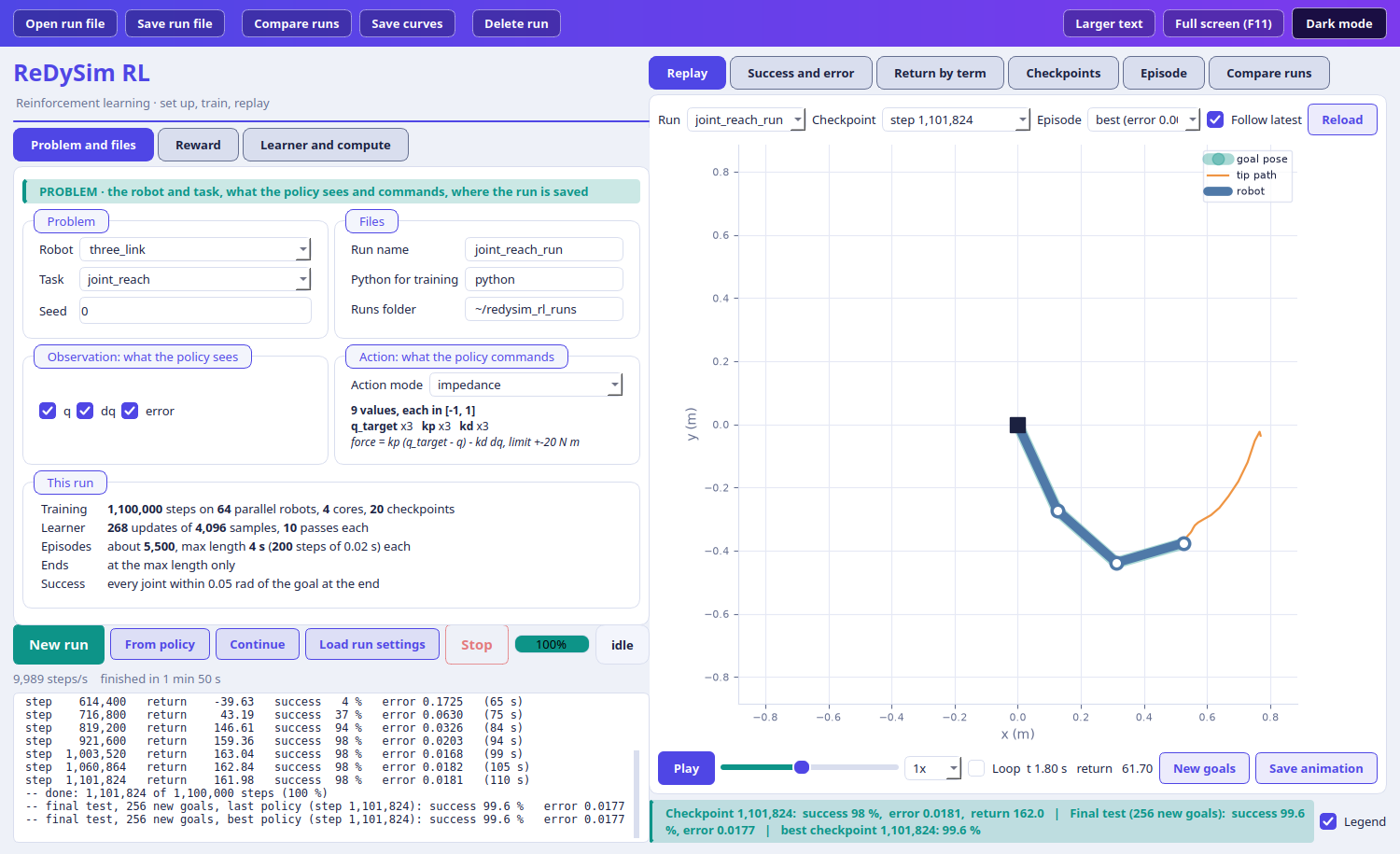
The manual's GUI chapter walks through the three settings tabs, New run, From policy and Continue, the result tabs, and comparing runs.
Next steps
Return by term, the final test, the best checkpoint, and comparing runs.
Reading the resultsWhat it has trained
What one run of each task reached: single runs with one seed, the final test on 256 new goals, on a laptop processor with 4 cores. Most were continued to more steps with Continue; three changed one setting (the cart-pole bonus, the acrobot's start height, the space robot's base weight).
| Task | Steps | At the goal | Training time |
|---|---|---|---|
| joint reach (three-link arm) | 1 100 000 | 99.6 % | 110 s |
| tip reach (three-link arm) | 2 000 000 | 97.7 % within 2 cm | 195 s (3 min) |
| joint reach (Kinova Gen3 Lite) | 5 000 000 | 96.9 % | 340 s (6 min) |
| tip reach (Kinova Gen3 Lite) | 12 000 000 | 94.1 % within 2 cm | 1367 s (23 min) |
| acrobot swing-up | 15 000 000 | 94.9 % swung up | 974 s (16 min) |
| cart-pole balance | 2 000 000 | 100 % | 238 s (4 min) |
| cart-pole swing-up | 5 000 000 | 100 % | 296 s (5 min) |
| 3-RRR platform reach | 1 000 000 | 100 % within 1 cm | 157 s (3 min) |
| space-robot reach (7-joint arm) | 5 000 000 | 91.8 % within 5 cm | 662 s (11 min) |
| wheeled robot to a goal between obstacles | 8 000 000 | 91.4 % reached, without a crash | 932 s (16 min) |
| car parking | 5 000 000 | 98.8 % parked | 1166 s (19 min) |
| quadruped, follow a commanded speed | 15 000 000 | 100 % followed, walking on four legs | 1016 s (17 min) |
The quadruped row walks with short, quick steps, all four feet stepping, at 0.3 to 0.5 m/s; it was trained for 15 M steps instead of the default 5 M.
Use it in your own code
The GUI runs Gymnasium vector environments (arms, an acrobot, a cart-pole, a parallel robot, a space robot, a wheeled robot and a quadruped; torque, PD-target, impedance and wheel-speed actions) that you can also use directly, for your own training algorithm, reward code, sweeps or automation. A policy the GUI saves can be loaded in your code.
import redysim_rl

env = redysim_rl.make_vec("joint_reach", num_envs=64, action_mode="impedance")
obs, info = env.reset(seed=0)
obs, reward, terminated, truncated, info = env.step(env.action_space.sample())
First example · Tasks and robots · Training in your own code
Licence
Free for research, teaching and other non-commercial use, under the PolyForm Noncommercial License 1.0.0. The download is on the Install page.