Environment: gravity and external forces
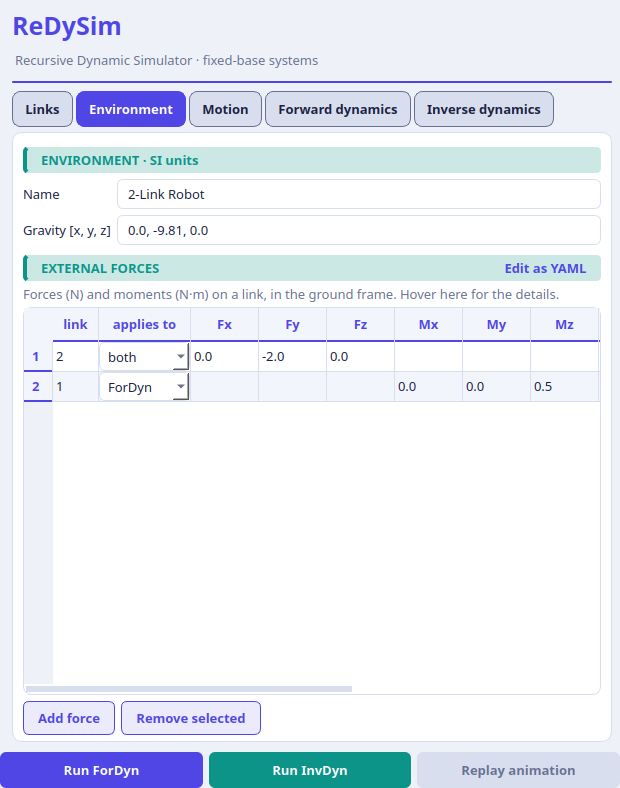
The Environment tab holds the robot's name, its gravity (a vector [x, y, z] in
m/s², 0, 0, 0 to turn it off) and the EXTERNAL FORCES table. The table adds forces and
moments that act on links: a weight hanging from the tip, a push for half a second, a thruster
fixed in a link. One table serves both kinds of run.
| column | meaning |
|---|---|
link |
the link the force acts on |
applies to |
both, ForDyn (forward dynamics only) or InvDyn (inverse dynamics only) |
Fx, Fy, Fz |
the force (N) |
Mx, My, Mz |
the moment (N m) |
from (s), to (s) |
the force acts only from this time to that time; leave empty for always |
px, py, pz |
where the force acts, in the frame of the link (default: the link's origin) |
frame |
ground: the force keeps its direction in space. link: it turns with the link |
Press Add force for a new row and Remove selected to delete the chosen rows. A wrong cell turns red, and a message under the table says why (for example link must be a whole number from 1 to 2, or 'from' must be less than 'to').
In inverse dynamics the forces needed are those besides the external ones: the table says what else is acting on the robot.
If a model file uses a custom force function, the table shows it as YAML text instead (Edit as YAML); it is kept and saved unchanged.
If you edit the file by hand
link, from, to and frame are flat keys, but Fx/Fy/Fz are one key, force: [x,
y, z], Mx/My/Mz are moment: [x, y, z], and px/py/pz are point: [x, y, z].
applies to is not a key at all — it only decides whether the GUI writes the force into
the external: list under fordyn:, under invdyn:, or (for both) into each. For example:
fordyn:
  external:
    - {link: 2, point: [0.25, 0, 0], force: [0, 0.5, 0], from: 0.2, to: 0.7}
The full field list is in the command-line manual's External forces section.