Edit the robot: the Links tab
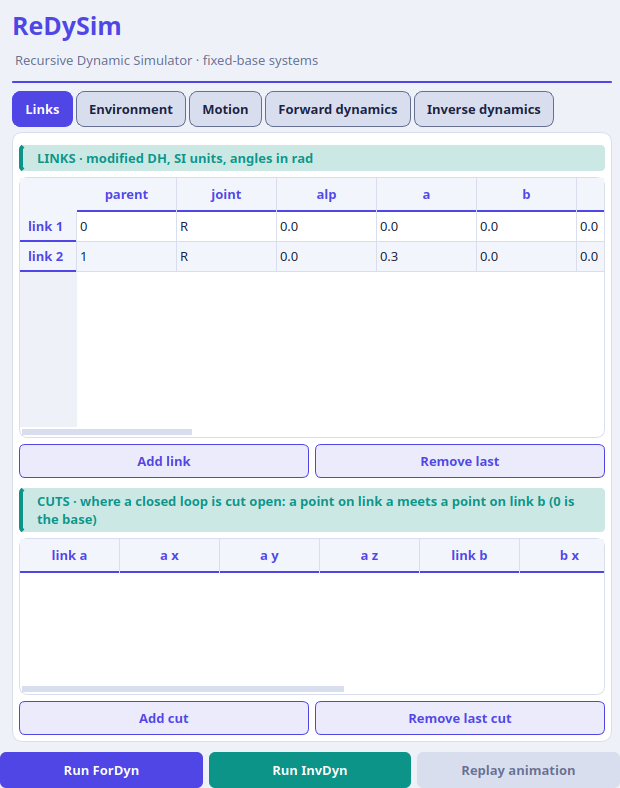
The table has one row per link and the columns below. A change is checked when you press Enter
or leave the cell; the drawing follows. A cell takes a number or a small expression: 0.25,
pi/2, radians(90), or 90d for 90 degrees (shown as radians(90) when you leave the cell).
Saving writes the value as a number.
| column | meaning |
|---|---|
parent |
the number of the link this one is attached to; 0 is the fixed base. A link that is the child of the same parent as another makes a branch (a gripper's fingers) |
joint |
R for revolute (it turns), P for prismatic (it slides) |
alp, a, b, th |
the modified Denavit-Hartenberg numbers of the joint: twist angle (rad), link length (m), joint offset (m) and joint angle (rad) |
mass |
the mass of the link (kg) |
cx, cy, cz |
the centre of mass, in the link's own frame (m) |
Ixx, Iyy, Izz, Ixy, Iyz, Izx |
the inertia about the centre of mass, in the link frame (kg m²) |
driven |
tick if the joint has a motor. It matters in a closed loop, where the unticked joints are the passive ones; in an open chain every joint is driven |
- Add link adds a row at the end with a first guess (a 0.2 m link); Remove last removes the last row. Each is a step you can undo.
- A change of the parent, or a joint going from
RtoP, changes how the robot is assembled, so look at the Model tab after it. - Things the table does not show are kept as they are when you save: the base position, a
branch angle or offset in the DH numbers (
phi,h), and the tip of a branch.
Closed loops: the Cuts table
Below the links, the Cuts table says where a closed loop is cut open: a point on link a
meets a point on link b (0 is the base). The point is given in that link's own frame (a x,
a y, a z and b x, b y, b z, in m), and dirs lists the directions held together:
xy for a planar loop, xyz in space. Add cut adds a row (the last link meeting the base,
in the plane) and Remove last cut removes one; each is a step you can undo. In a closed
loop, untick driven for the passive joints.
- A model made of repeated links (the 20-link chain) shows an empty, greyed table, and the links are used as they are in the file. Everything else can still be edited.
If you edit the file by hand
The table splits a few things into separate columns for editing; the file itself groups them.
If you are looking for a value in the .yaml file, or writing one by hand:
| in this table | in the file |
|---|---|
alp, a, b, th |
one key, dh: {alp: ..., a: ..., b: ..., th: ...} |
cx, cy, cz |
one key, com: [x, y, z] |
Ixx, Iyy, Izz, Ixy, Iyz, Izx |
one key, inertia: [Ixx, Iyy, Izz, Ixy, Iyz, Izx] |
driven |
the key is actuated (actuated: false for a passive joint); default true |
Cuts: link a, a x ... b z, dirs |
one entry per cut under cuts:, {a: ..., pa: [x, y, z], b: ..., pb: [x, y, z], dirs: xy} |
The full format — every key a link can have, tip, trace (which points the animation's
Trace paths follows; the table keeps it when you edit), repeat for identical links, numbers for
a uniform bar, and more — is in the command-line manual's
Describing a link and
Placing the frames
sections.